Eliminate manual bit packing errors with compile-time validation and code generation — full C++ implementation included.
blog.hirnschall.net


Renting a server with e.g. 1and1 (ionos) to host a website using wordpress and php feels dated in 2026. We will therefore switch to a modern, static site generation approach hosted with github pages and custom same-domain analytics living on cloudflare's edge. This way, we can have
Let's now formalize and discuss the must-have features mentioned above in detail before we go over the implementation:
Now that the requirements are clear, we can discuss how to implement each of them in a modern, scalable way.
I use a custom Python generator. It does what most static generators do: markdown to HTML with templates for figures, footers, listings. However, a few things in it are non-standard and worth discussing.
Using templates makes making site wide updates easy and efficient. Each article is split into a content file and a frontmatter json file containing its metadata.
While some try to block llm crawlers, we go the opposite route. We will try to make the site as llm-friendly as possible. For us, an llm linking and citing the page is the natural progression from search engines like google. For this the site generator outputs the following files:
As e.g. claude does not fetch pages that are disallowed in the robots.txt file, we will allow all pages and add x-robots-tag: noindex headers using cloudflare WAF. This way the files will not be indexed by google but still be accessible to LLMs.
The generator converts all included images to webp on build. Furthermore, it keeps track of which files are actually linked on the page. When building, it only copies the linked and converted files to the build directory to save bandwidth when deploying. During this process it also checks if any linked file does not exist in the build directory. If it finds a file is missing, we raise an error, failing the pipeline.
Citations and references are implemented similar to latex. Each figure, reference, listing, etc. gets a name we can use in the text to reference it. This way we avoid wrong numbering issues.
The big thing to implement is analytics. All available options are either paid, share data, or require a cookie consent banner. Other issues include that they are not live or that they do not count every individual visitor.
As we cannot use php, we will rely on client side js and cloudflare edge workers + D1 storage.
We setup an endpoint on our domain to handle analytics requests from the client side js. The worker itself is also written in js but runs on the edge. On page load, we will send an init request to the endpoint to add the user's session. Furthermore, we will send heartbeat requests to update the time on page and we will send custom events to the endpoint. What we collect and why is the topic of the next sections.
One important benefit of this approach is that the analytics endpoint is hosted on the same domain as the page. It is therefore not subject to cross-origin restrictions and practically not distinguishable from other requests. This means that e.g. Adblockers will not block these requests as they do for e.g. google analytics.
Before we dive into both the client side and the server side implementation details here is a high level architecture diagram (fig. 1):
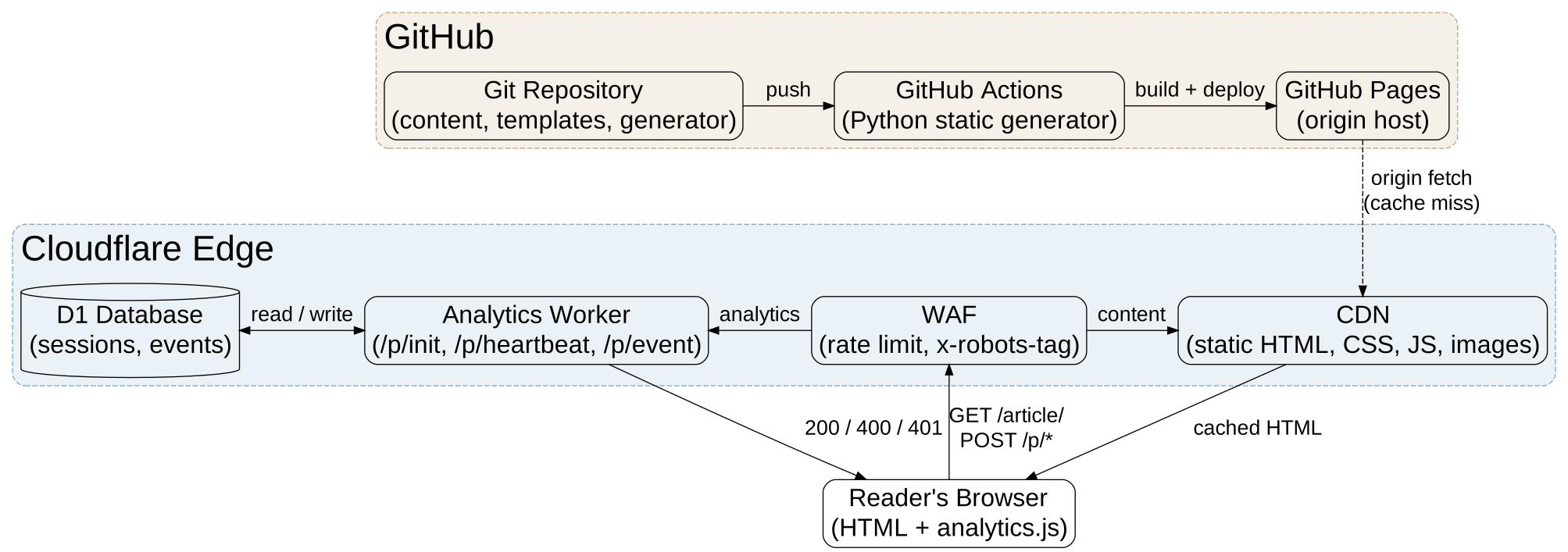
As mentioned above, we split into init, heartbeat, and events. So let's take a closer look at what this practically means and why we do it:
On page load, we send an init request to the worker. This creates a new entry in the D1 database. We track sessions and returning visitors using the anonymized/truncated IP address. Cloudflare already sees the IP as the CDN, so the analytics worker isn't a new data flow to them. The client side js also generates a random uuid and provides it to the server. Furthermore, the document.referrer is recorded.
The client side js is shown below:
function sendInit() {
    fetch(ANALYTICS_ENDPOINT + '/init', {
        method: 'POST',
        headers: { 'Content-Type': 'application/json' },
        body: JSON.stringify({
            uuid: pageUUID,
            page: pagePath,
            referrer: document.referrer || ''
        })
    });
}To keep track of time spent on each page, the client side js sends heartbeat requests at regular intervals. Here the uuid is used to identify the user's session and update the correct DB entry.
function sendHeartbeat(delta) {
    fetch(ANALYTICS_ENDPOINT + '/heartbeat', {
        method: 'POST',
        headers: { 'Content-Type': 'application/json' },
        body: JSON.stringify({ uuid: pageUUID, delta })
    });
}As there are several other things we want to track, we can also send 'events' to the endpoint. For this site, these are split into
a tags on load. Clicks are then split into internal, outbound, referral, newsletter signups, and downloads.Adding other (new) events is straightforward. The client side js just needs to send the event data to the endpoint. The listing below shows the client side event handler.
function sendEvent(type, url, anchorText) {
    navigator.sendBeacon(
        ANALYTICS_ENDPOINT + '/event',
        new Blob([JSON.stringify({
            uuid: pageUUID,
            type: type,
            url: url || '',
            anchor_text: anchorText || '',
            page: pagePath
        })], { type: 'application/json' })
    );
}
In case a user does not want to be tracked, the analytics_optout cookie is checked. If it is set to 1, all tracking is disabled client side. If you want to, you can set the cookie here.
To avoid inflated numbers due to crawlers triggering the js, we have several options to detect and ignore bots.
knownBot=1 GET argument also disables analytics tracking. LLMs are instructed to use it in llms.txt and robots.txt. So, if I want to audit the site using llms, I can instruct them to use this argument. This is especially useful for xAI's Grok as it does not disclose its bot status.The client side user agent handling is shown below. It is a simple regex match for known bot user agents. One notable thing is that we explicitly enable tracking for llm-user agents. These are requests on behalf of actual users and should be treated as such. The code also shows the knownBot flag:
function botDetected() {
    if (new URLSearchParams(window.location.search).get('knownBot') === '1') return true;

    if (document.cookie.includes('analytics_optout=1')) return true;

    const ua = navigator.userAgent || '';

    if (/chatgpt-user|claude-user|perplexity-user/i.test(ua)) return false;

    const isAutomated = !!navigator.webdriver;
    const bots = /bot|crawl|spider|google|bing|baidu|yandex|duckduckgo|facebook|slurp|exabot|facebot|scraper|headless|puppeteer|playwright|selenium|phantomjs|prerender|rendertron|screenshot|preview|facebookexternalhit|twitterbot|linkedinbot|slackbot|discordbot|are\.na|arena|microlink|diffbot|iframely|PTST|lighthouse|gptbot|chatgpt|claudebot|claude-searchbot|oai-searchbot|perplexitybot|anthropic-ai|anthropic|claude/i;

    return isAutomated || bots.test(ua);
}The worker implementation itself is also minimal and straightforward. All it needs to do is listen for the requests discussed in the client side js section above and update/write to the D1 database.
After adding a connection to the D1 database in the cloudflare dashboard we can handle requests as shown using env.DB.
Let's look at the implementation of each endpoint. For readability sake CORS headers, server-side data extraction, and POST restriction checks have been removed.
Once an init request is received by the worker, it checks if the uuid and page are set. If they are, a new DB entry is created with strftime('%Y-%m-%d %H:00:00', 'now') for the timestamp. Timestamps are bucketed to the nearest hour.
if (path === '/init') {
    const { uuid, page, referrer } = body;

    if (!uuid || !page) {
    return new Response('Bad Request', { status: 400, headers: corsHeaders });
    }

    await env.DB.prepare(`
    INSERT INTO sessions (uuid, ipan, bot_score, referrer, page, timestamp, time)
    VALUES (?, ?, ?, ?, ?, datetime('now'), 0)
    `).bind(uuid, ipan, botScore, referrer ?? '', page).run();

    return new Response('OK', { status: 200, headers: corsHeaders });
}The heartbeat is more interesting. In line 4, we not only check if the uuid is set, but we also check if the delta sent by the client is whitelisted. If either one is missing, we return a '400' bad request response.
if (path === '/heartbeat') {
    const { uuid, delta } = body;

    if (!uuid || ![5, 30].includes(delta)) {
    return new Response('Bad Request', { status: 400, headers: corsHeaders });
    }

    await env.DB.prepare(`
    UPDATE sessions SET time = time + ?
    WHERE uuid = ?
    `).bind(delta, uuid).run();

    return new Response('OK', { status: 200, headers: corsHeaders });
}Lastly, the event endpoint is the most complex to implement. Line 7 now checks if the event type sent by the client is a valid event type using a whitelist. We also check if a DB entry for the uuid exists. If not, it's a '401' error. If everything is valid, we insert the event into the database.
if (path === '/event') {
    const { uuid, type, url: eventUrl, anchor_text, page } = body;

    const validTypes = [
    ];

    if (!uuid || !type || !validTypes.includes(type)) {
    return new Response('Bad Request', { status: 400, headers: corsHeaders });
    }

    // Only insert if session exists - prevents spoofed UUIDs
    const session = await env.DB.prepare(`
    SELECT uuid FROM sessions WHERE uuid = ?
    `).bind(uuid).first();

    if (!session) {
    return new Response('Unauthorized', { status: 401, headers: corsHeaders });
    }

    await env.DB.prepare(`
    INSERT INTO events (session_uuid, type, url, anchor_text, page, timestamp)
    VALUES (?, ?, ?, ?, ?, datetime('now'))
    `).bind(uuid, type, eventUrl ?? '', anchor_text ?? '', page ?? '').run();

    return new Response('OK', { status: 200, headers: corsHeaders });
}To prevent abuse of the endpoints and we have to enable rate limiting in Cloudflare. We do not do this inside the worker as this would still count as a request. We can use WAF rules to block users based on the number of requests in the last n seconds. This way, the unwanted requests do not reach the worker in the first place.
Note: This is very important for anything other than the free tier as other plans include pay-as-you-go!
Furthermore, whenever user data is inserted into the database, we validate it against a whitelist where possible and use prepared statements to prevent SQL injection.
The main limitation of our analytics solution is session tracking. Multiple users on the same NAT, e.g. at universities or companies, are collapsed into a single user. If the users ip changes, they count as a new user, not a returning one. Lastly, bot detection works quite good but would require using either google recaptcha v3 or paying for Cloudflare's bot management to improve further.
Overall I am very happy with how the site works now. Updating is now just a git push, writing new articles no longer requires copying whole html pages, updating the style of the whole blog is easy. No more FTP, no more manually uploading files and hoping I did not miss one, no more breaking the site's old posts with js or css updates and of course proper version tracking with git.
The new analytics solution works very well. In other words, "it just works". While hosting the blog at 1and1 (ionos) with php, I already used a similar custom solution. During the move to github pages I tried google analytics for a short time but had major issues with it. No real referrer tracking, no accurate data due to adblockers, sharing data with google, consent redirects, and so on.
Writing new posts is finally just that. Writing new posts. No more fiddling around with html. It not only is more fun but it is also much faster.
Not using server side php also makes the site more performant as html, js, and css is efficiently cached by cloudflare. Something the php site failed to do.
Last but not least, the only real running cost of the blog is also gone.

Eliminate manual bit packing errors with compile-time validation and code generation — full C++ implementation included.

Define equation templates, specify your knowns, let a symbolic solver derive the unknowns. Applicable to any physics system.

This project (with exceptions) is published under the CC Attribution-ShareAlike 4.0 International License.